How to search iMessages by date
Messages on iPhone can't filter search results by date. You can search for a word and see the date once the chat opens, but you can't ask for everything from one week. Misento, an iPhone app that helps you understand your relationships in iMessage, has a When filter on its search that does.
In Messages
- In the list of conversations, tap the Search field.
- Type a word you think was in the message.
- To limit it to one person, type their name and choose them under Messages with.
- Tap a result. The chat opens at that message, with its date above it.
- Scroll up or down from there to read what was said around that day.
This works when you remember a word. When all you remember is roughly when, there's nothing to search for: Messages has no date filter, on iPhone or on a Mac. With Apple Intelligence, iOS 26 understands descriptions like "photos from our June trip" when searching photos, but that doesn't give messages a date filter.
In Misento
- Bring your messages into Misento, once, with a shortcut on iOS 26 or later or from a Mac.
- Search from the Contacts tab, or tap the magnifying glass inside a conversation to search only that chat.
- Type a word, then tap When.
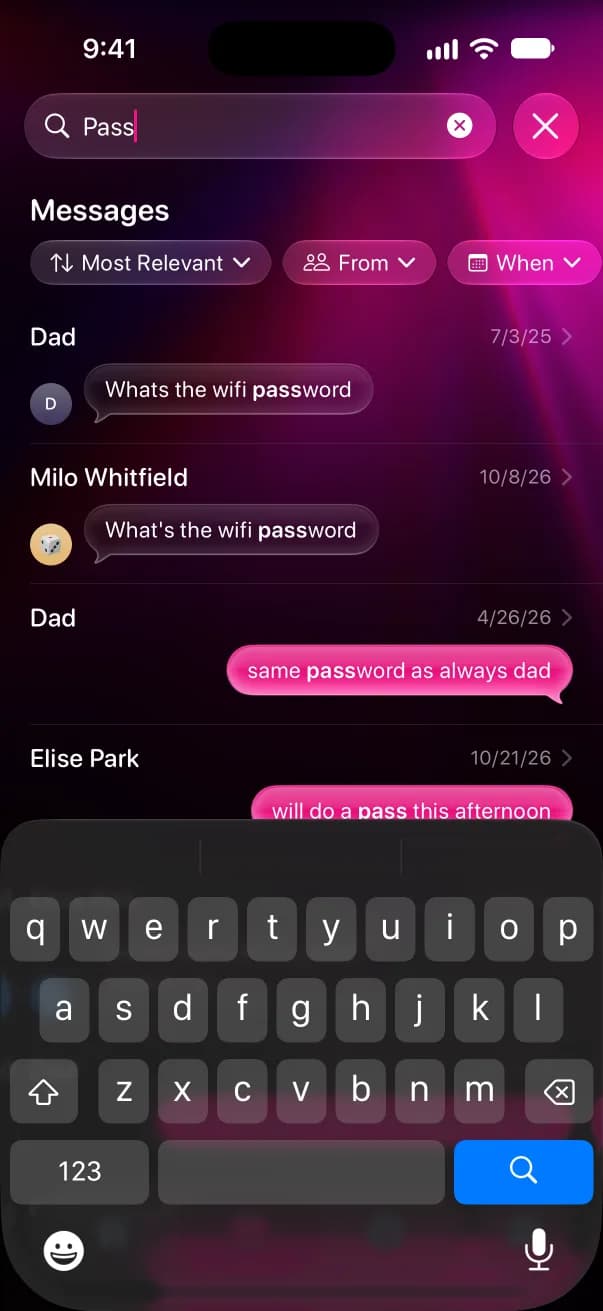
- Pick Last 7 days, Last 30 days, Last 3 months or Last 12 months, or Custom to set your own From and To dates.
- Tap Most Relevant and choose Oldest to read the results in order, or Newest to start from the latest.
From limits the search to the chats you pick. The menu after When narrows it to messages you sent or received, or to group or one-on-one chats. Every result shows its date, and tapping one opens the conversation at that message.
Browse a chat by date
Search needs a word. To move through a conversation by date instead, open its Messages tab in Misento and pinch to zoom out. A rail of dates runs down the right side, and dragging it moves through time.
Search is free, and it's part of Misento's iMessage analyzer.
Questions
Can I search my iMessage history by date?
Not in Messages. It searches words, people, photos and links, but has no date filter on iPhone or Mac. Misento's search has one, with preset ranges and custom From and To dates.
How can I search old iMessages?
Search covers every message still on your iPhone, however old. If an old message doesn't turn up, it may have been deleted by the Keep Messages setting; seeing the first message on iMessage explains how far back your history goes.
How can I view my entire iMessage history?
Open a conversation and keep tapping the clock at the top of the screen to load older messages. Misento shows how long you've been texting someone, and since when, on each chat's Analytics tab, which counting your texts covers.
Seif makes Misento.
Misento brings in your messages on iPhone with a shortcut, on iOS 26 or later, or from a Mac.
Get Misento for iPhone