How to see how many texts you've sent someone
iPhone doesn't count the messages in a conversation. Misento, an iPhone app that helps you understand your relationships in iMessage, shows the total for every chat on its Analytics tab, and each side's share.
In Misento
- Bring your messages into Misento, once, with a shortcut on iOS 26 or later or from a Mac.
- Open the conversation from the Contacts tab and switch to the Analytics tab.
- Messages, at the top, is how many you've both sent, all time. History says how long you've been texting and since when.
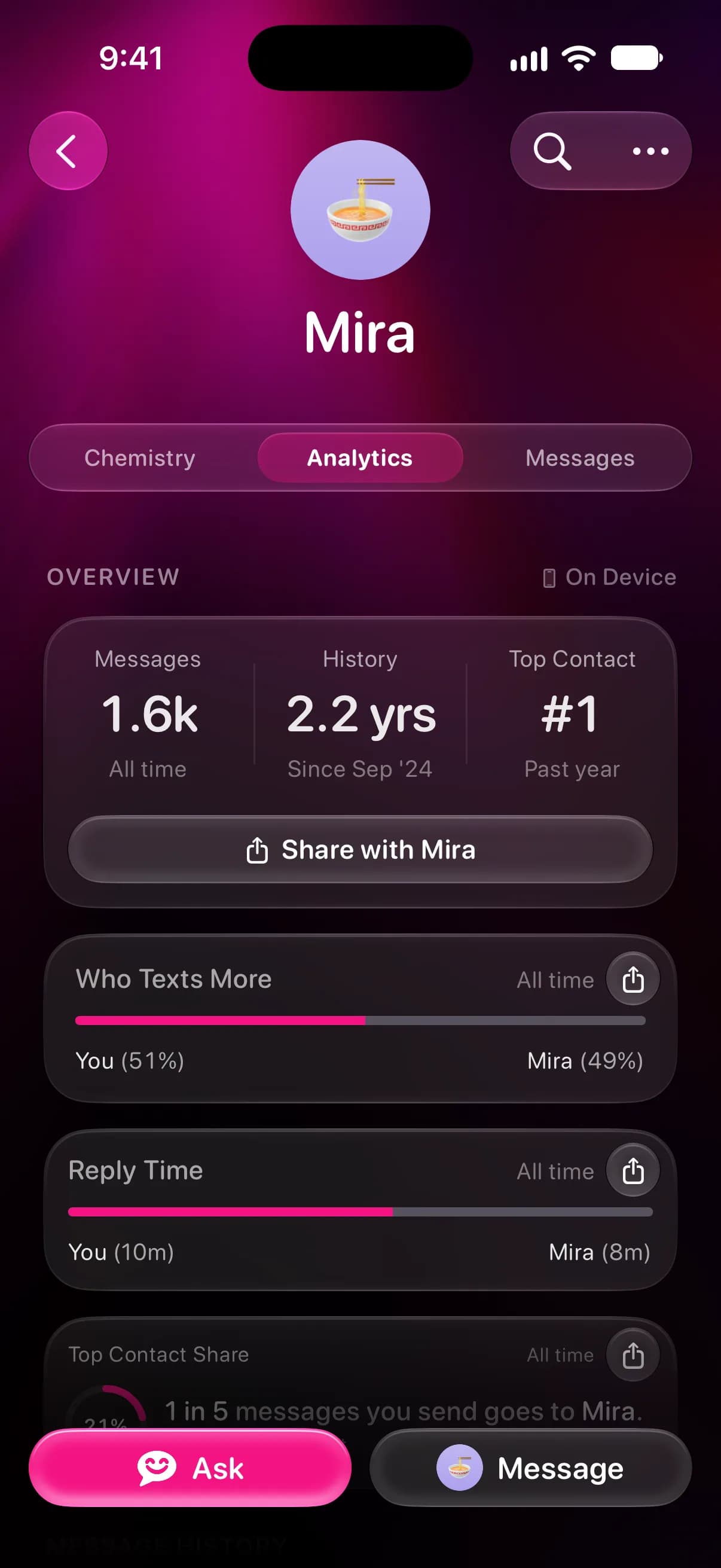
- In a one-on-one chat, Who Texts More below it shows each side's share, and Top Contact Share says what part of all the messages you send go to this person.
Misento counts texts, photos and other attachments, and tapbacks, but not system messages like a group name change. The Analytics tab is free, and it's part of Misento's iMessage analyzer.
Questions
Can you see how many messages you've sent on an iPhone?
Not in Messages or Settings. iPhone keeps no count of messages, per person or in total. Misento shows them for every chat.
How do I see my total for all chats?
In Misento, open the Profile tab. Message Activity there covers all your chats, and See All Years lists each year's total. To rank people by count instead, see who you text the most.
How do I see my full text history on iPhone?
Messages loads older messages as you scroll up. Seeing the first message on iMessage shows the quickest way to the start of a chat, and why older messages are sometimes missing.
Seif makes Misento.
Misento brings in your messages on iPhone with a shortcut, on iOS 26 or later, or from a Mac.
Get Misento for iPhone