How to see who texts first
iPhone doesn't track who starts your conversations. You can count it by hand in Messages, noting who sends the first message after each long silence, or let Misento, an iPhone app that helps you understand your relationships in iMessage, count it: its You Start card shows the share of a chat's conversations that began with you.
Count it by hand in Messages
- Open the conversation and scroll back to where you want to start counting, a month ago for example. Tapping the clock at the top of the screen loads older messages.
- Swipe left on the messages to see the time each one was sent.
- Pick a rule for a new conversation, like a message after six hours of silence, and keep to it.
- Move down through the chat. Each time a message follows that much silence, note who sent it.
- Leave out replies to a question left hanging, like a "yes" the next morning to "dinner tomorrow?". They finish a conversation rather than start one.
- Divide your starts by the total. If you started 12 of 20, you started 60%.
A month of a busy chat takes a while to count, and the answer covers only that month.
In Misento
- Bring your messages into Misento, once, with a shortcut on iOS 26 or later or from a Mac.
- Open the conversation from the Contacts tab and switch to the Analytics tab.
- Under Highlights, You Start shows the share of conversations you started, across your whole history.
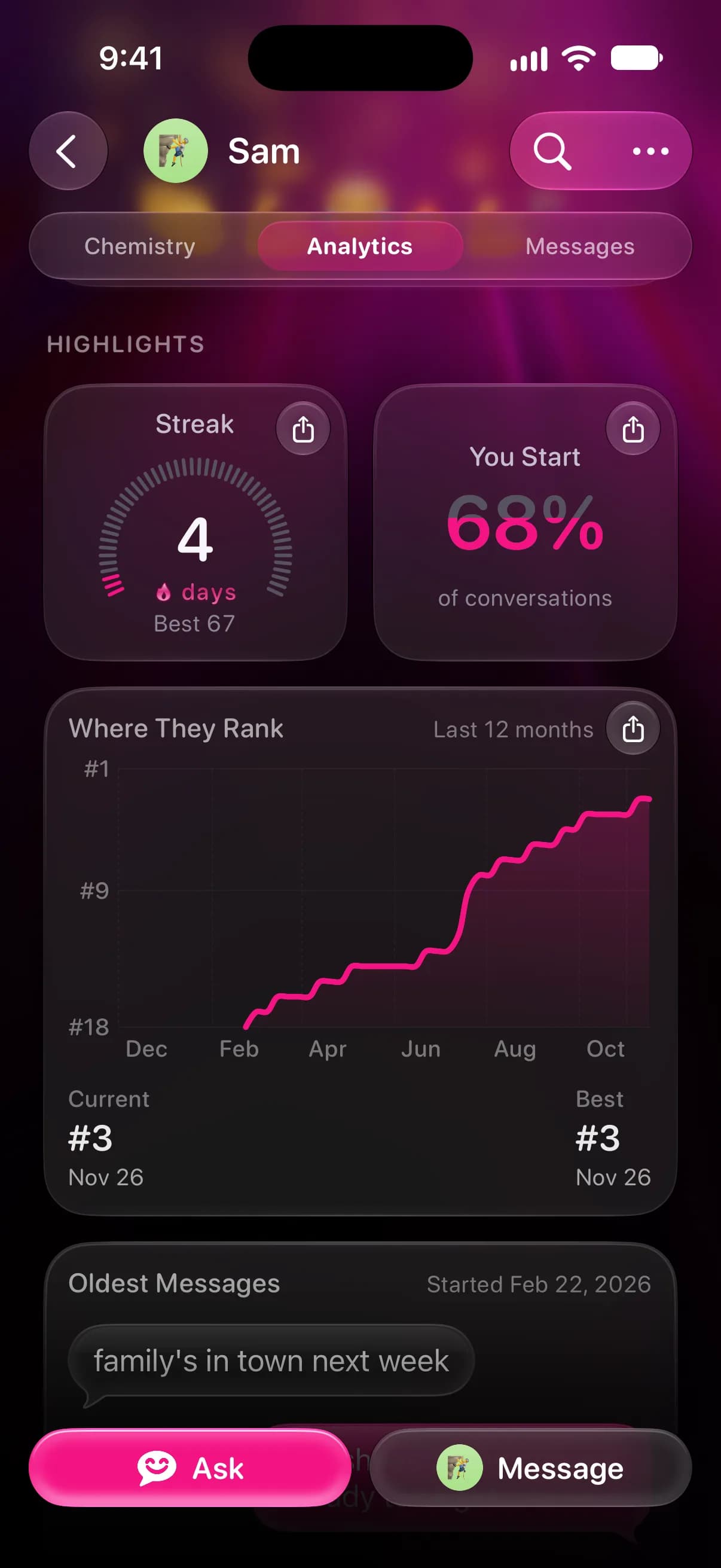
- For all your one-on-one chats together, open the Profile tab. Its You Start card covers the last 30 days.
How Misento decides a conversation started
Misento counts a message as the start of a conversation when it comes after a quiet stretch. The stretch is 8 hours until the two of you have answered each other at least 24 times. After that, Misento sets it from how long replies between you usually take, anywhere from 2 to 48 hours, so two people who text all day get a shorter stretch than two who talk once a week.
A message that answers a question the other person asked doesn't count as a start, however late it arrives. Tapbacks never start a conversation, and system messages, like a renamed group, aren't counted.
What the number tells you
Who starts is one habit. Some people rarely text first but always answer quickly, so read it next to reply time. A share near 50% means you take turns. A lopsided one can come from different schedules, from one person doing the planning, or from one person who would rather call. It counts messages; it doesn't measure how anyone feels.
If the share has shifted over time, texting less than you used to shows how to see when. You Start is free, and it's part of Misento's iMessage analyzer.
Questions
Does it matter who texts first?
On its own, not much. Who starts reflects schedules and habits as much as interest, and someone who rarely starts may answer quickly and at length when you do. If it bothers you, asking them tells you more than a percentage.
Can I see who sent the first message ever in a chat?
Yes. Go to the start of the conversation, which seeing the first message on iMessage explains step by step. In Misento, Oldest Messages on the Analytics tab shows a chat's first four messages and who sent each.
Seif makes Misento.
Misento brings in your messages on iPhone with a shortcut, on iOS 26 or later, or from a Mac.
Get Misento for iPhone