How to see who you text the most on iPhone
iPhone doesn't rank the people you text: Messages sorts chats by the latest message, and Screen Time counts time in apps, not texts per person. Misento, an iPhone app that helps you understand your relationships in iMessage, ranks everyone you text in a list called Most Sent.
Without an app
iPhone has no ranking of the people you text, and the places that look like one count something else.
- Messages sorts conversations by the latest message, not by how many you've sent.
- Screen Time shows how long you spent in Messages and how many notifications it sent, but not who they were from.
- Your carrier's usage page may list texts by number, but only SMS and MMS. iMessages go over the internet, so they don't appear there.
In Misento
- Bring your messages into Misento, once, with a shortcut on iOS 26 or later or from a Mac.
- Open the Profile tab. Under Your people, Top Contacts shows who you sent the most messages to in the last 30 days.
- Tap See All to open the full ranking, Most Sent.
- Use the menus at the top to change what it ranks.
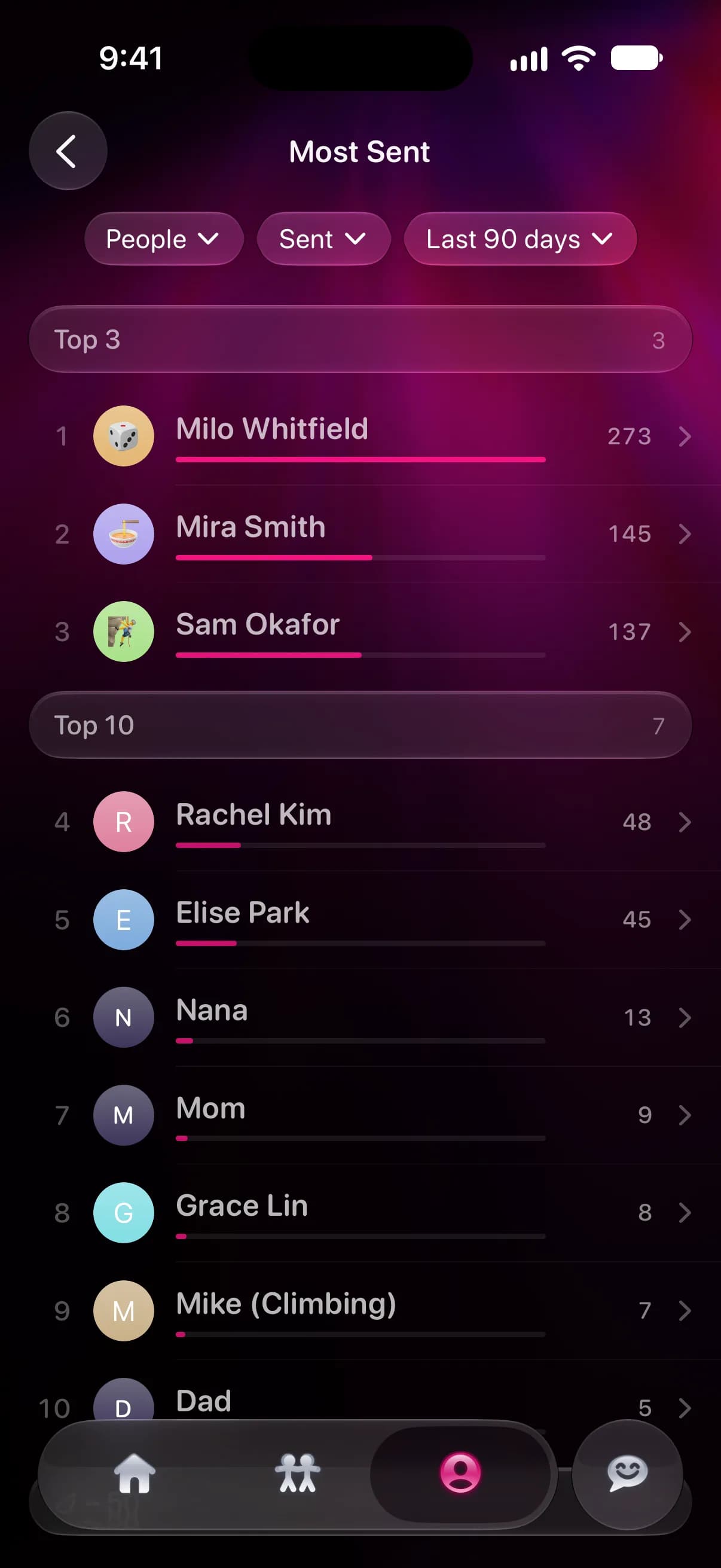
The first menu switches between people and group chats. The second ranks by messages you sent, messages you received, or both. The third sets the time: the last 7, 30 or 90 days, the last year, or all time. Last year and All time need Misento Pro; the rest are free.
Tap anyone in the list to open your conversation with them, where the Analytics tab shows how many texts you've sent each other and how fast each of you replies.
Questions
How do you see top conversations on an iPhone?
Messages has no list of top conversations by number of messages; it only orders them by the most recent. Misento's Most Sent ranks them, for people or group chats, over the time range you pick.
Does sent or received change the ranking?
It can. Someone you message a lot may send few texts back, and a group chat can send you far more than you send it. Switching between Sent, Received and Both shows the difference.
Most Sent is part of Misento's iMessage analyzer.
Seif makes Misento.
Misento brings in your messages on iPhone with a shortcut, on iOS 26 or later, or from a Mac.
Get Misento for iPhone